


New article
Recently updated
Adding links to internal or external pages

Who is this article for?
Users working with the creator module.
Creator module access is required.
You can add links to external websites or internal pages within Noise Lab using the link icon in the text editor toolbar.
Creating a link to an external website
To create a link to an external website:
- Copy the full URL from the website you want to link.
- Go back to the text in Noise Lab where you want to place the link.
- Select the text.
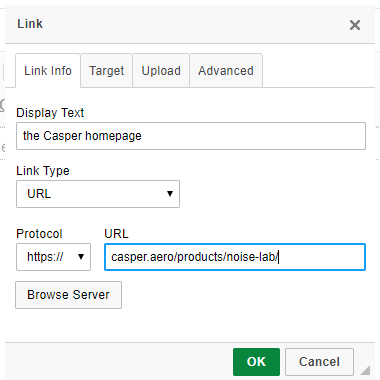
- Click the link icon in the text editor toolbar.
- Paste the URL into the URL field.
The protocol automatically adjusts to the correct value.
Creating a link to an internal page
To create a link to an internal page within Noise Lab:
- Copy the part of the URL that appears after
.aero.(for example,/item/page editing). - Select the text in Noise Lab where you want to place the link.
- Click the link icon in the text editor toolbar.
- Paste the URL portion into the URL field.
The protocol changes to <other>.